
Multi-Paper Synthesis, Extraction Matrix & Writing
Beyond single-paper deep reading, Prism accelerates systematic literature reviews, structured multi-paper extraction, library organization, and manuscript drafting.
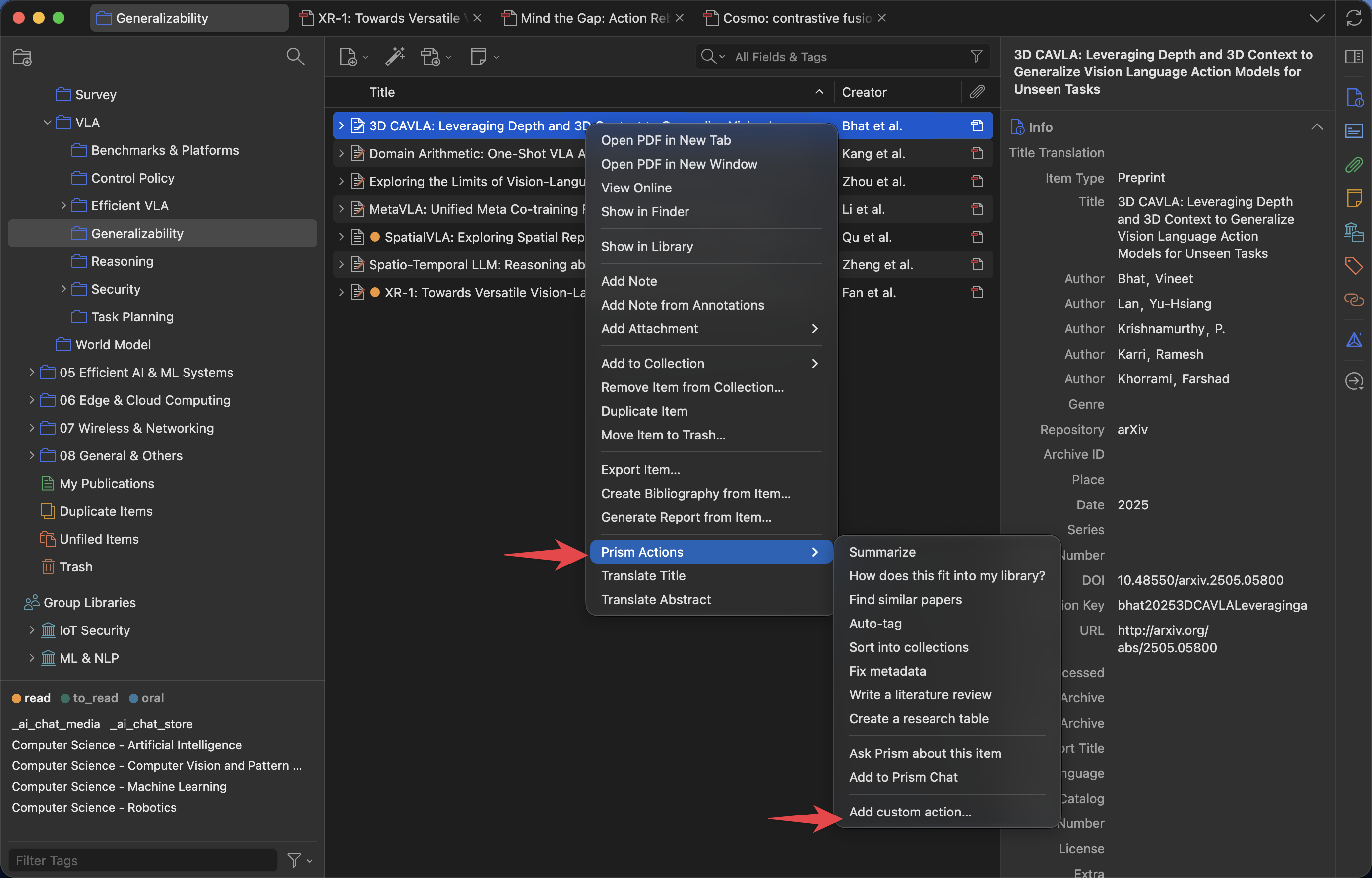
1. Library Right-Click Prism Actions ▸
Right-click one or multiple papers in your Zotero Library and open Prism Actions ▸. Prism ships with 9 built-in workflows:
At the bottom of Prism Actions ▸, you also get Ask Prism about this item, Add to Prism Chat (adds up to 15 items at once), and Add custom action…. Right-clicking any Zotero collection provides Ask Prism about this collection.
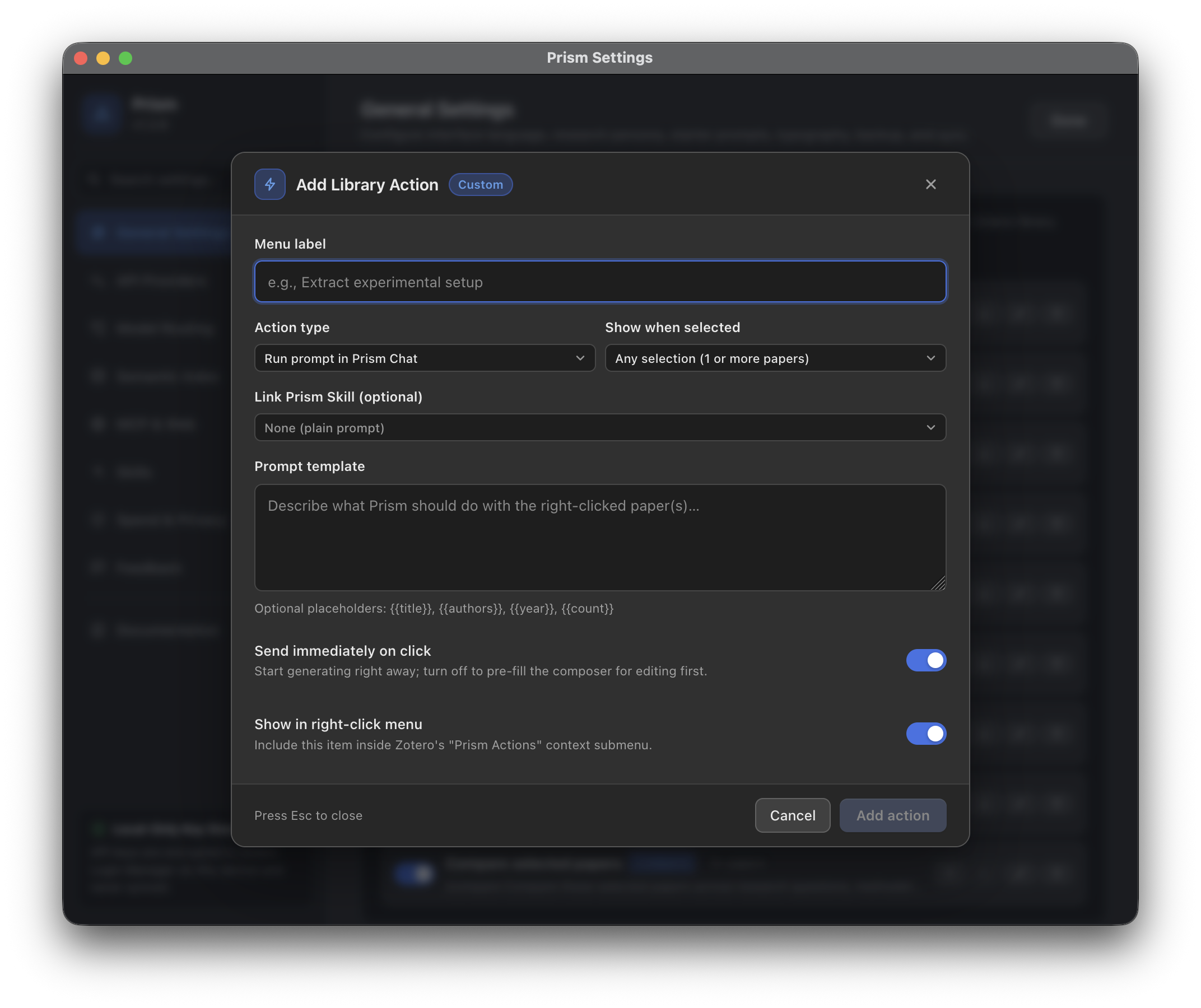
Customizing Your Own Library Actions
Open Prism Settings → General Settings → Library Right-Click Actions to configure up to 24 custom actions:
- Action Kind: Choose
Run prompt in Prism ChatorOpen Research Extraction Matrix. - Selection Scope: Show on
Any selection (1 or more papers),Single paper only, orMultiple papers (2+). - Bind to a
/Skill: Link directly to any built-in or customSKILL.mdcommand. - Dynamic Placeholders: Use
{{title}},{{authors}},{{year}}, and{{count}}inside your custom prompt template (up to1,200chars). - Dispatch Behavior: Choose
Send immediately on clickorDraft only(populates the composer so you can tweak the prompt first). - Enable/disable, reorder, edit, delete, or click
Reset defaultsanytime.
2. Standalone Research Extraction Matrix Studio
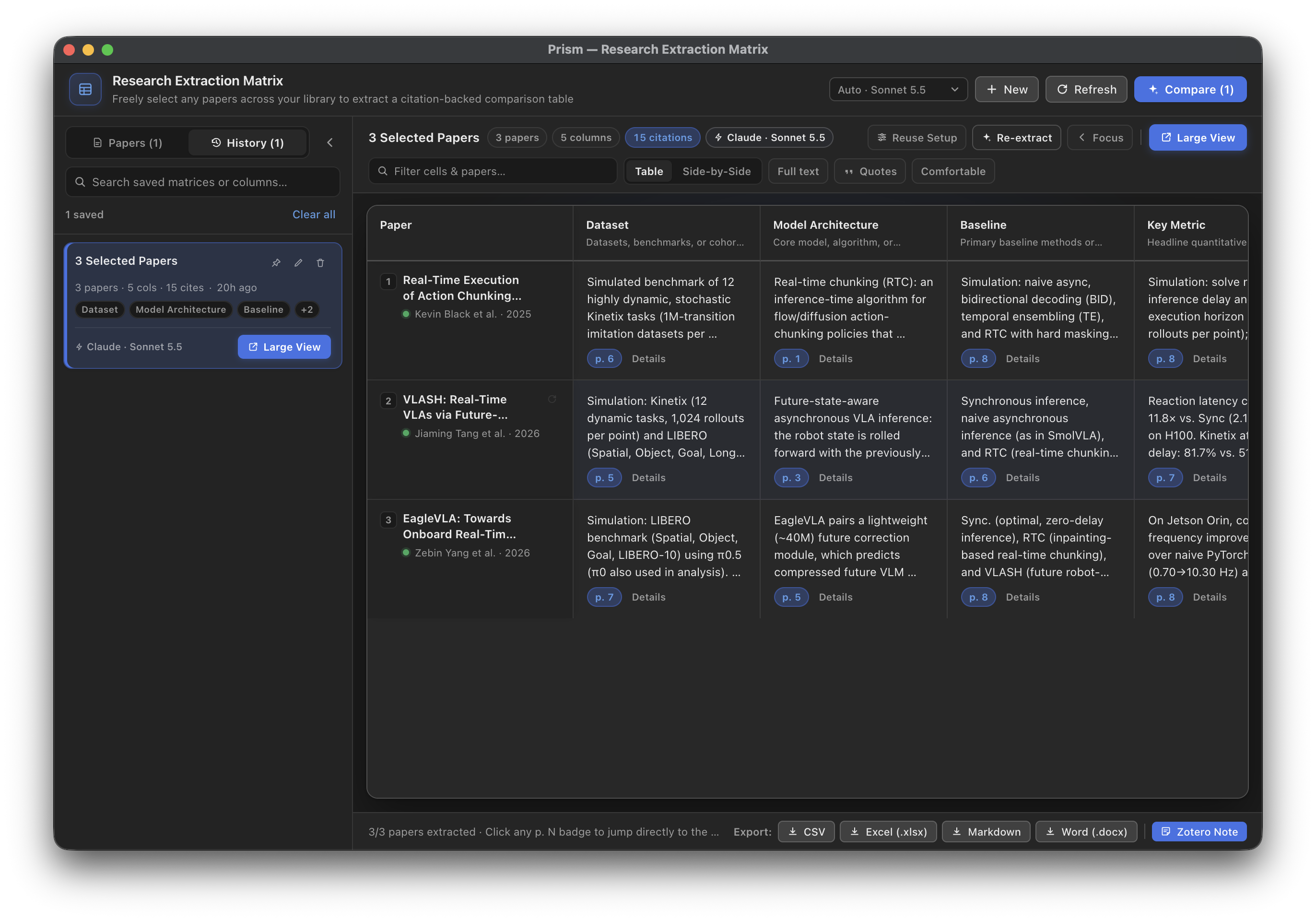
Open the Research Extraction Matrix from the sidebar header Table icon or via Prism Actions ▸ Create a research table to build publication-grade comparison tables across up to 35 papers per matrix:
Step-by-Step Workflow
- Pick Your Papers (Resizable Paper Picker):
- Resize the left picker panel (
240px – 460px) or toggleFocus/Sidebarto collapse it while reviewing results. - Browse up to
1,500library items viaAllvsSelected (N)sub-tabs, filter by All Library, Selected in Zotero, Active Paper, or any hierarchical Collection (including nested subcollections), search by title/author/year/venue/tag, and inspect per-paperPDF/Metadata/Active/Zotero Selectedstatus badges. - Use
+ Zotero selection,Select visible, orRefreshto stay synced with Zotero.
- Resize the left picker panel (
- Choose or Customize Columns (
1 – 12columns): Start from one of 3 built-in academic presets or customize columns in a centered modal (custom name + extraction criteria prompt in any language, reorderable up/down):- ML & AI (default):
Dataset·Model Architecture·Baseline·Key Metric·Limitations - Empirical / Clinical:
Research Question·Study Design & Sample·Intervention / Method·Primary Findings·Limitations - Literature Survey:
Core Contribution·Methodology·Evidence / Scope·Key Takeaways·Open Gaps
- ML & AI (default):
- Select Model & Run (
Compare (N)): Leave onAuto(uses your Fast / Cheap route, falling back to Active Chat) or pick any configured model, then clickCompare (N)(showsExtractwhen 0 papers are selected).- Smart Page Selection: Reads standard papers cover-to-cover (up to
22pages /68kchars on>= 96k-context models); for book-length monographs/theses, automatically prioritizes Pages 1–2, Conclusion/Limitations, and column-matched pages while deprioritizing pure References/Bibliography pages. - Run Controls: Click
Stop (completed/total)to cancel mid-batch,Re-extractto re-run the whole table with another model,Newto start a fresh canvas (keeping the current table in History), or click per-rowRetryon any row (completed or failed) to re-extract just that paper with the currently chosen model.
- Smart Page Selection: Reads standard papers cover-to-cover (up to
- Filter, Inspect Evidence & Jump to PDF:
- Use
Filter cells & papers…for live multi-token search across extracted cells, paper metadata, and verbatim quotes (X of Y papers). - Hover any cell for quick
Copy(copies value +(p. N)), or click any cell (orDetailson truncated cells) to open the docked right-hand Evidence Detail drawer with the full extracted value, verbatim quote, column criteria,Copy, clickable paper title to open in Zotero, andJump to p. N in Zotero.
- Use
- View Controls & Pop-Out
Large View(Matrix Viewer):- Switch between
TableandSide-by-Side(transposed) views, toggle inlineQuotes/Full text/CompactvsComfortabledensity, and drag column dividers (Reset widths). - Pop out
Large View(from the toolbar or any History card) for full-screen reading with a saved-matrix switcher dropdown,A−/100%/A+zoom buttons (85%–130%, also⌘=/⌘-/⌘0), and anOpen Studioreturn button.
- Switch between
- Saved History & Reuse: Prism saves up to 50 matrices locally (
<ZoteroProfile>/prism-cache/extraction-history.v1.json). Pin important matrices so they survive auto-pruning, rename or search past matrices, and clickReuse Setupto reload a matrix's papers and column schema when you want to add new papers and re-extract.
Five Offline Export Formats (Zero External Services)
3. Publication-Ready Copy & Export Formats
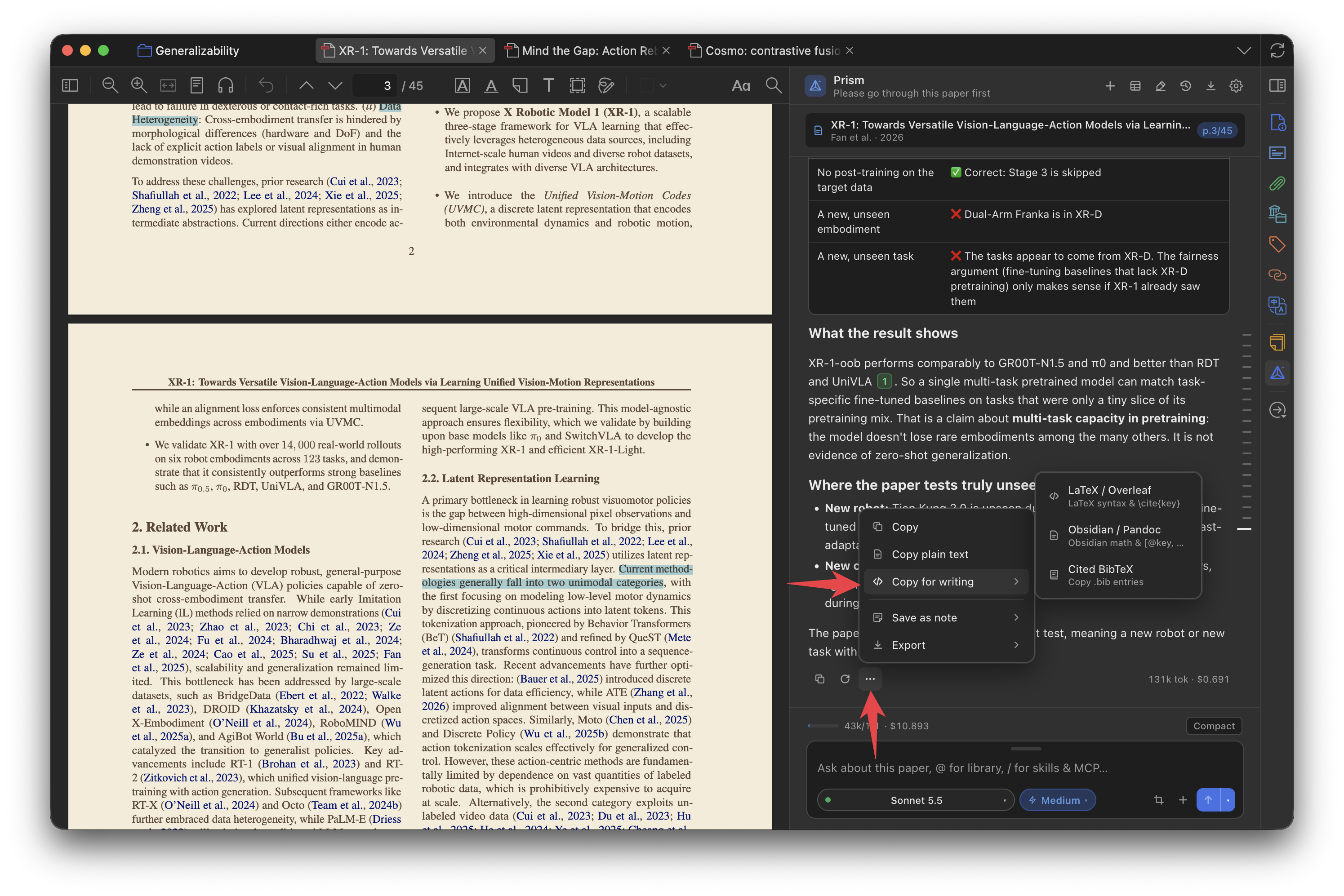
Prism offers academic export actions in two places:
- Per-Message
⋯Menu:Copy(Markdown),Copy plain text,Copy for writing ▸(LaTeX / Overleaf,Obsidian / Pandoc,Cited BibTeX),Save as Note ▸(Child Note/Standalone Note— embeds generated or attached images and automatically saves as a Standalone Note when no paper is active), andExport ▸(Word (.docx)…/Markdown (.md)…). - Sidebar Header Export Menu:
Export Active Branch (.md),Export Literature Review (.docx),Export Full Tree (.md),Copy for LaTeX / Overleaf,Copy for Obsidian / Pandoc,Copy Cited BibTeX (.bib), andSave as Zotero Note.
What Each Academic Format Produces
- LaTeX / Overleaf: Converts headings (
\section), bold/italic (\textbf/\emph), code (\texttt), nested lists (\begin{itemize}), tables (\begin{tabular}), links (\href), and display math (\[...\]), rewriting inline citation badges into\cite[p.~4]{citekey}(or merged\cite{key1,key2}). - Obsidian / Pandoc: Rewrites citations into
[@citekey, p. 4], normalizes MathJax delimiters (\(...\)→$...$,\[...\]→$$...$$), and turns<details>blocks into foldable Obsidian callouts (> [!note]-). - Cited BibTeX (
.bib): Generates clean BibTeX entries for every paper cited in that response or conversation branch—ready to paste straight intoreferences.bib. - Copy Plain Text: Strips Markdown markers cleanly while preserving identifiers like
snake_caseand formatting tables into readable tab-separated rows.
Citekey Auto-Detection Order (Personal & Group Libraries)
Prism automatically resolves citation keys in this exact priority order:
- Better BibTeX (
KeyManager.get(item.id)) — works across both personal and group libraries. - Zotero 8+ native
citationKeyfield. Extrafield lineCitation Key: yourkey.- Deterministic fallback:
firstAuthorLastName + year + firstTitleWord(e.g.,diao2021heterofl, withb,c, … suffixes on collisions).
4. Independent Bilingual Translation (/translate)
Open Prism Settings → General Settings → Research Persona & Response Language:
- Preferred Response Language controls your regular reading and discussion replies (e.g.,
Auto — match my promptorEnglish). - Target Translation Language (
/translate) is completely independent (Auto,English,简体中文,繁體中文,日本語,한국어,Deutsch,Français,Español, or any custom language up to80chars). - Smart Auto-Direction & Bilingual Mode: When Target Translation Language is set to
Auto, it follows your Preferred Response Language; if both areAuto,/translateautomatically translates English → Simplified Chinese and non-English → English. Ask for a "bilingual side-by-side" translation to get a two-column aligned table, and Prism appends a concise Key Terms glossary while preserving equations and symbols.
It applies exclusively to /translate in chat and Zotero Reader's Translate with Prism selection popup—never changing your regular discussion language.