Providers, Models, Routing & Spend Control
Prism follows a strict Bring Your Own Key (BYOK) architecture. Requests travel directly from Zotero on your computer to your chosen cloud API or local inference server—with zero middleman servers and zero markup.
1. Supported Provider Families
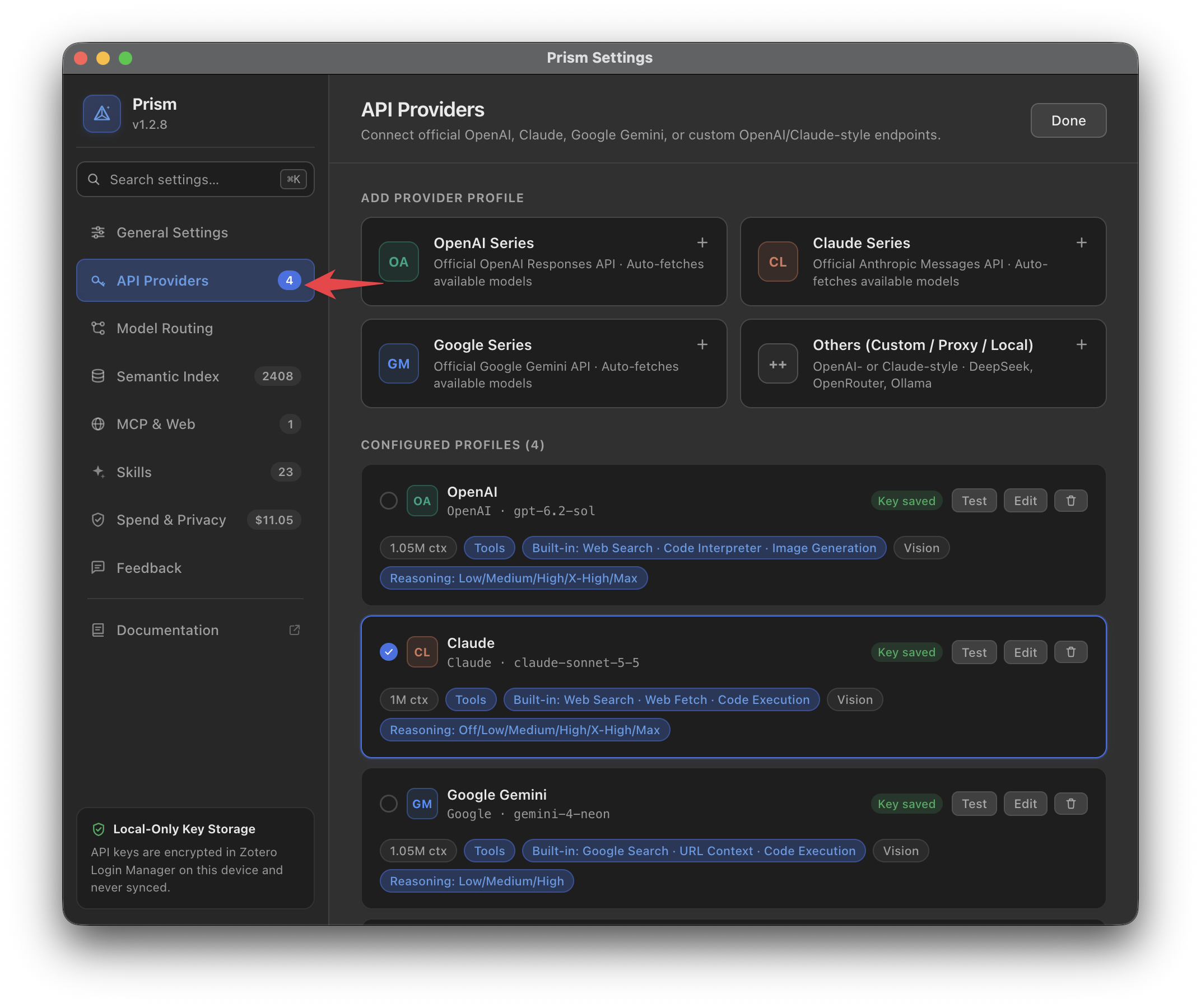
Open Prism Settings → API Providers → Add Provider Profile and choose one of four families:
Quick-Fill Templates Under Others
When adding an Others provider, click a built-in template to pre-fill the protocol, Base URL, and key setting:
For vLLM or self-hosted OpenAI-compatible servers, choose Others → OpenAI-style, enter your endpoint (for example http://localhost:8000/v1), expand ▸ Advanced options (token cap, capability overrides, headers), check No API key required (e.g., local Ollama / LM Studio) if unauthenticated, and click Fetch Models.
Provider Editor Controls & Advanced Overrides
- Auto-Fetch Models: After pasting a valid API key (
>= 12chars) or selecting a keyless local endpoint, Prism automatically fetches/modelsafter a short debounce—no extra clicks needed. - Key Management & Live Capabilities: Toggle
Show/Hideon your key, clickRemove saved keyto revoke local credentials, and preview live capability badges (ctx,Tools,Built-in,Vision,Image Out,Reasoning,Reasoning Trace). ▸ Advanced options (token cap, capability overrides, headers)(Others):- Custom HTTP Headers (
Header: Value, one per line—secret headers are automatically scrubbed from backups). - Prompt Token Cap / Context Window Override:
2,048 – 10,000,000tokens in the editor (live/modelsresponses also auto-detectcontext_length/inputTokenLimit/max_model_len/n_ctxand model-ID suffixes like-32kor-1mfor up to200models per provider). - Capability Overrides: Tool Calling, Vision Input, Image Output, Embedding Model, and custom Reasoning Effort levels.
- Custom HTTP Headers (
2. Live-Fetched Models, Quick Switcher & Reasoning Effort
Prism never ships stale hardcoded model dropdowns. Fetch Models sorts live models by release recency, displays the 5 most recent non-embedding models cleanly by default, and lets you pin up to 50 additional model IDs via inline + Add model.
During daily reading, click the model selector pill in the sidebar footer to open the Quick Model Switcher—switch directly across configured providers and recent/pinned model chips, click Refresh SOTA models to refresh all providers at once, or open Manage providers….
Reasoning Effort / Thinking Selector
In the Prism sidebar footer, adjust Reasoning Effort per provider (off, minimal, low, medium, high, xhigh, max depending on model support):
- OpenAI: Maps directly to
reasoning.effortacrosso1/o3/o4andGPT-5+reasoning models. - Claude: Uses Adaptive Thinking (
output_config.effort, auto-scalingmax_tokensup to64k) on Claude 4.6/5+ models, and calibrated thinking token budgets (1,024 – 32,768tokens) on Claude 3.7 / 4. - Google Gemini: Uses
thinkingLevelwithincludeThoughts: trueon Gemini 3/4+, andthinkingBudget(0 – 24,576tokens) on Gemini 2.5. - DeepSeek / OpenRouter / Custom: Uses native reasoning parameters or your custom overrides.
Seamless Mid-Thread Switching, Self-Healing & Reliability
- Mid-Thread Cross-Model & Cross-Provider Switching: You can switch between OpenAI, Claude, Gemini, DeepSeek, and Ollama inside the same conversation. Prism automatically downgrades unsupported images/SVGs into text descriptions for text-only models and bypasses OpenAI-only encrypted compaction blocks on non-OpenAI providers so full history stays valid without HTTP
400errors. - Automatic Capability Self-Healing: If a third-party gateway or API tier rejects a native server tool, external MCP schema,
cache_control,prompt_cache_key,reasoning.summary, or Gemini explicit cache, Prism strips only the rejected field and retries cleanly without dropping built-in Zotero tools. - Stream Stall Protection: Cloud SSE streams detect silent/dead connections after
180sof zero bytes; idle timeouts are disabled for local endpoints so slow local reasoning models never time out prematurely.
3. OS-Encrypted Local Key Storage
All provider API keys, external MCP bearer tokens, and BYOK search keys are encrypted on disk using Zotero's built-in Login Manager (Services.logins). Credentials are strictly device-local: they are never synced via Zotero Sync / WebDAV and never written into exported Settings JSON backups.
4. Five-Slot Task-Based Model Routing
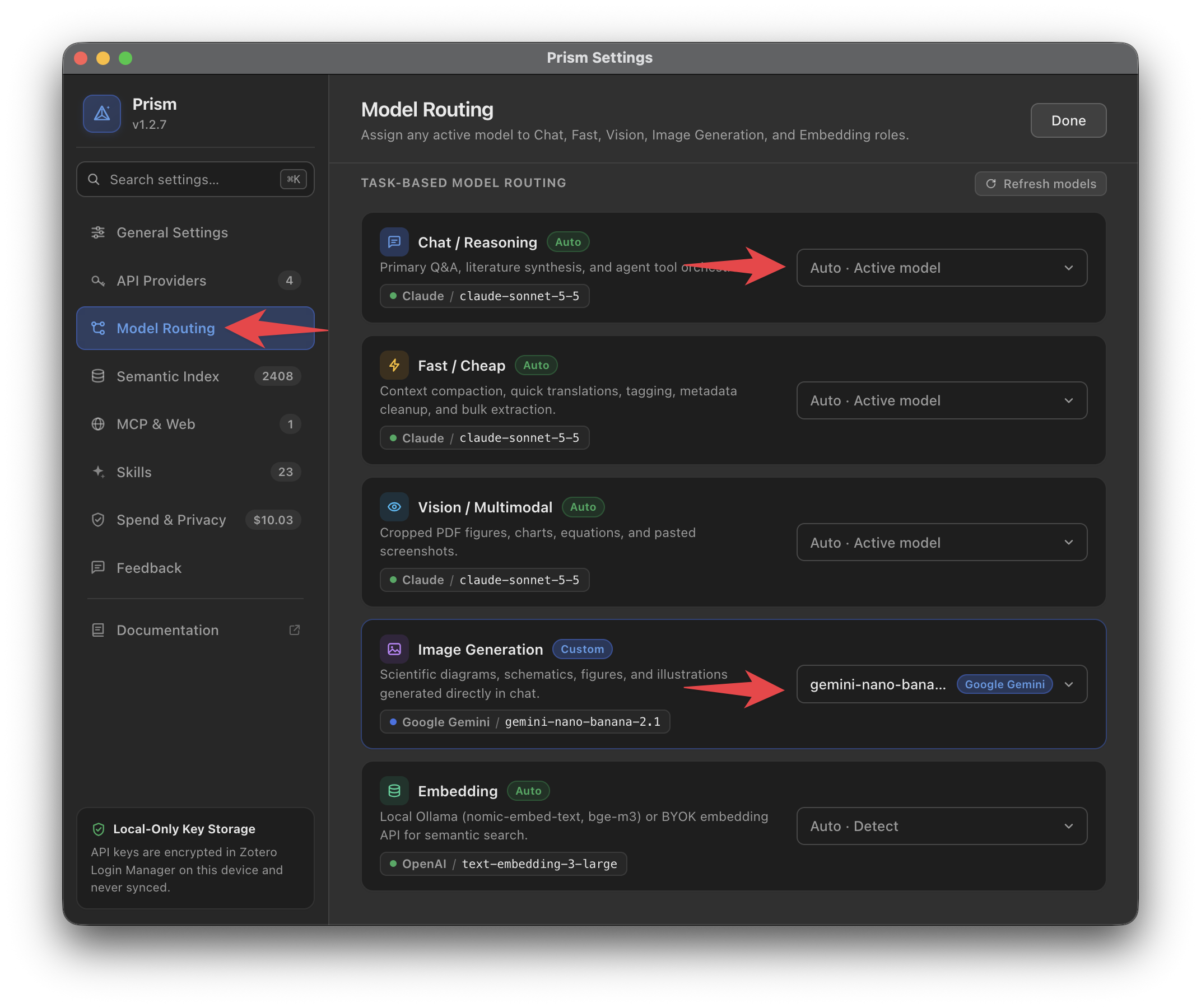
Under Prism Settings → Model Routing, assign specialized Provider :: Model pairs across 5 task slots (with built-in Mismatch Warnings if a non-vision, non-embedding, or non-image model is assigned to a specialized slot, plus a Refresh models button):
How Automatic model selection in chat Works
When Automatic model selection in chat is enabled (default: on):
- If an embedding-only or image-only model is left selected in the sidebar, chat turns safely route to your Chat / Reasoning slot.
- Prompts with attached images or visual figure/chart/diagram queries automatically upgrade to your Vision slot.
- If your active chat model lacks tool calling, explicit image-generation prompts auto-route directly to your Image Generation slot (without hijacking Mermaid, Graphviz, SVG, TikZ, LaTeX, or chart JSON requests).
- Lightweight turns (
/translate, or concise<= 340-character glossary, proofread, or citation-format requests with<= 1mention, no images, and no deep-reasoning cues) route to an explicitly assigned Fast / Cheap slot whenever the prompt fits<= 85%of its context window. - Privacy-Safe Long-Context Upgrade: If a prompt exceeds
90%of the active model's context window, Prism can upgrade to a larger-window configured model while enforcing a strict one-way privacy boundary—a local prompt is never silently routed to a cloud provider.
5. Automatic PDF Delivery Modes & Native Server Tools
- Provider Built-In Server Tools: Toggle
Enable provider built-in server tools by defaultunder Settings → General Settings → Agent & Cost Guardrails (default: on) to enable or disable OpenAI/Claude/Gemini provider-hosted web search, URL fetch, code execution, and image generation. - Automatic PDF Delivery Tiers (no manual toggle required):
- Native PDF Upload (Official Claude, OpenAI, Gemini, plus Claude-Style Proxies under
Others):- Uploads the original PDF once via the provider's Files API and reuses the handle across turns:
- Claude & Claude-Style Proxies: up to
32 MBand100pages (cached23h; automatically falls back to inline raw PDF<= 24 MBif a proxy doesn't support/v1/files). - OpenAI: up to
48 MB(cached23h; inline fallback<= 24 MB). - Gemini: up to
50 MBvia resumable upload (cached44h; inline fallback<= 18 MB).
- Claude & Claude-Style Proxies: up to
- Uploads the original PDF once via the provider's Files API and reuses the handle across turns:
- Structured Markdown / Text Fallback (OpenAI-style
Others, Local LLMs, Oversized PDFs):- Converts the PDF locally to structured Markdown (
<= 45 MB), falling back to Zotero's live PDF.js text layer, Web Snapshot DOM,.zotero-ft-cache, and bibliographic metadata.
- Converts the PDF locally to structured Markdown (
- On-Demand Vision Page Rendering (
view_paper_pages& Crop-to-Chat):- Renders up to 4 PDF pages per call as JPEG (
1400px) for scanned PDFs or tiny visual details, alongside 1-click page capture and area cropping in the Reader.
- Renders up to 4 PDF pages per call as JPEG (
- Native PDF Upload (Official Claude, OpenAI, Gemini, plus Claude-Style Proxies under
6. Provider-Native Prompt Caching
Keep Enable prompt caching (Claude / OpenAI / Gemini) on (default: on) under Settings → General Settings to unlock automatic multi-turn input discounts:
- Anthropic Claude: Places up to 4 ephemeral
cache_controlbreakpoints across tools, static system instructions, attached PDFs, and rolling conversation prefixes (~90% off cache reads;1.25×write). - OpenAI: Uses a deterministic prefix paired with an opaque, secret-free
prompt_cache_keyhash on the Responses API (~75%–90% off reads depending on model generation). - Google Gemini: Tracks automatic implicit cache hits (
cachedContentTokenCount) on all models, plus creates an explicitcachedContentscache (30 minTTL, auto-refreshed when< 10 minremain, and automatically deleted when switching papers or closing Zotero so you aren't billed for idle storage) on Gemini 2.5 & 3.x whenever a PDF exceeds32,768estimated tokens (~90% off reads). - DeepSeek: Automatically reflects DeepSeek's 90% off prefix cache hits in spend estimates.
7. Local Usage & Spend Dashboard
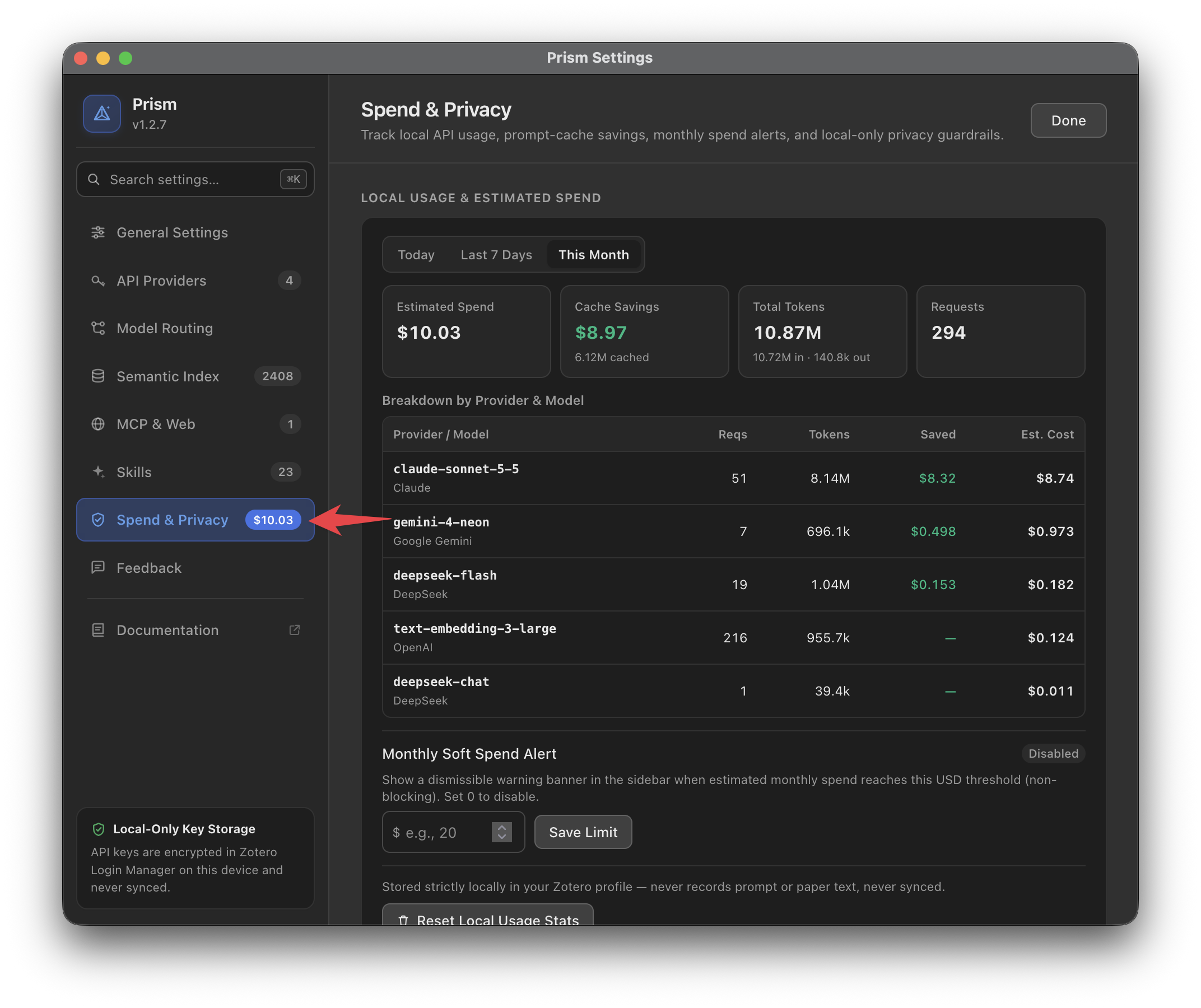
Open Prism Settings → Spend & Privacy to monitor API consumption transparently:
- 3 Time Windows: Today (since local midnight), Last 7 Days, and This Month.
- Metrics: Estimated USD Spend, Prompt-Cache Savings (USD + cached tokens), Total Tokens (
input · output), Request Count, and a Per-Provider / Model breakdown table acrosschat,compaction,extraction, andembeddingoperations. - Monthly Soft Spend Alert: Enter any USD amount (for example
20) to display a gentle, dismissible warning banner in the sidebar with aView Spendshortcut (0disables the alert). - Per-Message Token & Cost Pill: Toggle
Show token & estimated cost readoutunder General Settings (default: on). Hover any message's token/cost pill to inspect exactInput,Output,Cached,Cache write, andThinkingtoken counts. - Zero-Content Local Ledger: Stored solely on your machine at
<ZoteroProfile>/prism-cache/usage-ledger.v1.json(ring buffer of5,000numeric entries; never synced; zero prompt text, paper titles, or keys recorded). ClickReset Local Usage Statsanytime to clear it.