
Semantic Index, Privacy Guardrail, Sync & Customization
Prism is engineered for researchers managing multi-thousand-paper libraries alongside unpublished manuscripts, grant drafts, and confidential peer reviews.
1. Device-Local Semantic Index (Tier 1 & Tier 2 Hybrid Search)
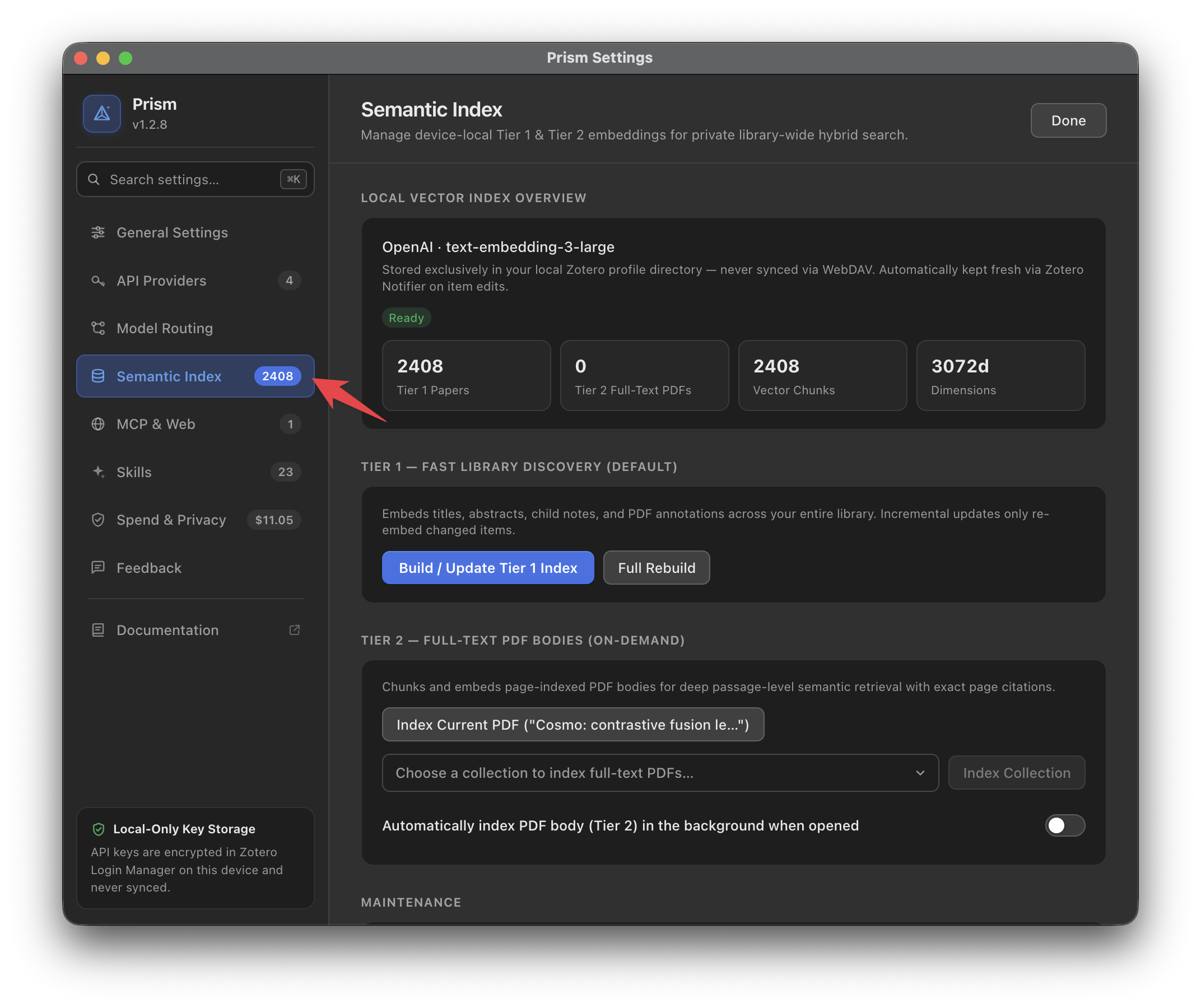
Open Prism Settings → Semantic Index to give Prism fast, conceptual library-wide recall—stored strictly on your local disk at <ZoteroProfile>/prism-cache/semantic-index.v1.json (never uploaded to WebDAV or third-party clouds).
Prerequisite: Configure an Embedding Model
Assign an embedding model under Prism Settings → Model Routing → Embedding (for example, local Ollama nomic-embed-text or bge-m3 for 100% offline indexing—working with either http://localhost:11434/v1 or bare http://localhost:11434—or an OpenAI / Google embedding model).
Two Indexing Tiers
Hybrid Ranking & Graceful Offline Degradation
Queries combine dense cosine similarity (0.72) and BM25-style lexical matching (0.28) via Reciprocal Rank Fusion (k=40), capping at 2 chunks per paper to preserve cross-paper diversity. If chunks already exist locally while your embedding API is offline, Prism degrades gracefully to lexical-only ranking over your indexed chunks. You can Cancel an in-progress run or click Clear Local Vector Index anytime.
2. Local-Only Privacy Guardrail (Fail-Closed)
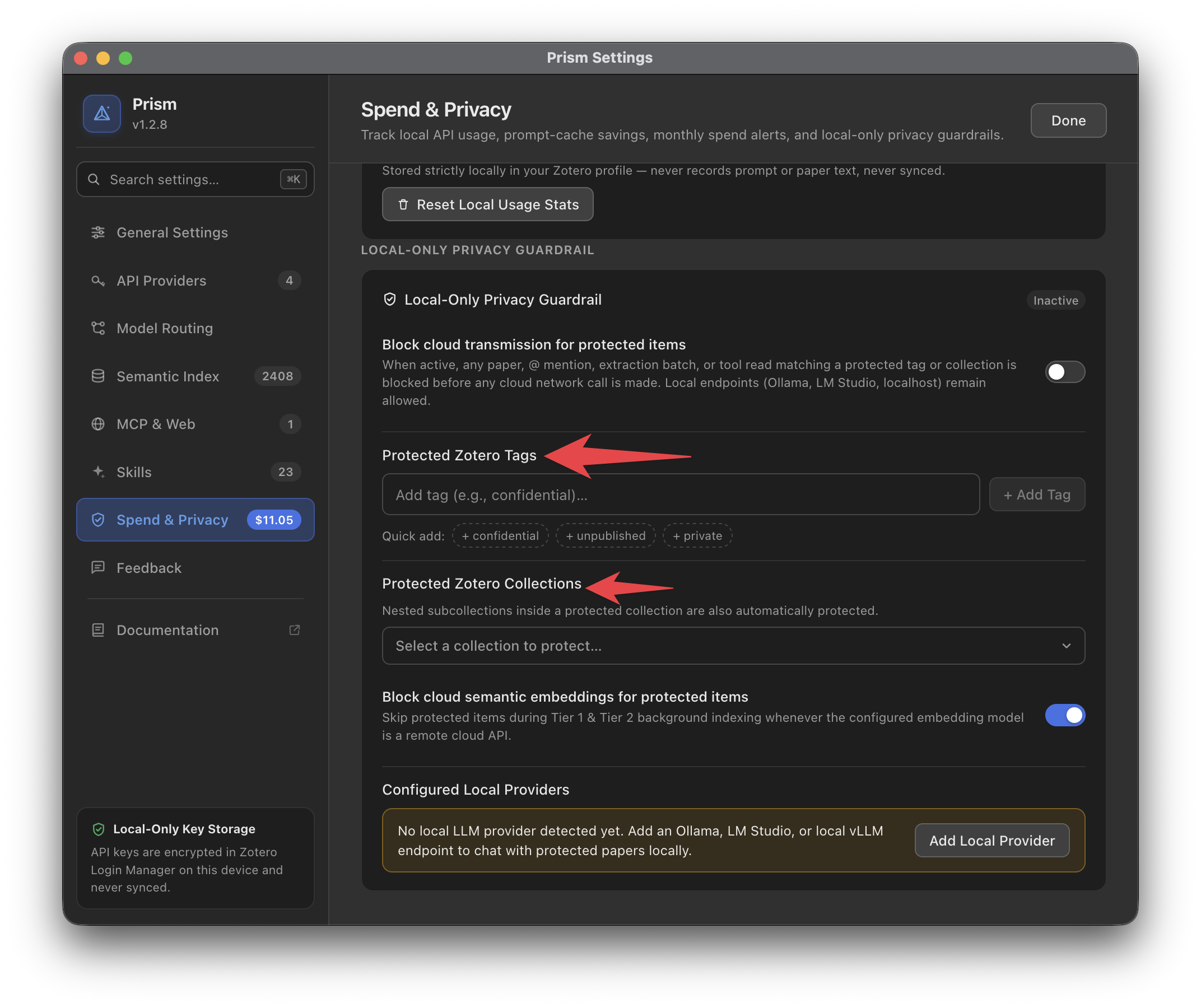
Open Prism Settings → Spend & Privacy → Local-Only Privacy Guardrail to guarantee that confidential drafts, clinical data, or unpublished manuscripts never leave your machine.
Configuration
- Toggle
Block cloud transmission for protected itemson. - Add up to 40 protected Zotero tags (quick-add chips:
confidential,unpublished,private) and up to 60 protected collections (all nested subcollections are automatically protected too). - Keep
Block cloud semantic embeddings for protected itemsenabled (default: on).
Fail-Closed Enforcement & Allowed Local Endpoints
Whenever any attached paper, collection, mention, or tool lookup touches a protected item—or if an item's metadata cannot be verified (metadata_ambiguous)—Prism blocks the request before data leaves your computer:
- Blocks cloud chat turns, follow-ups, context compaction, Extraction Matrix runs, vision crops, cloud embeddings, external Crossref lookups, and remote HTTP MCP calls.
- Strictly allowed endpoints: Only true local loopback and
.localhosts (localhost,127.x.x.x,::1,0.0.0.0,*.local,*.localhost—even remote LAN IPs are blocked for fail-closed safety). - One-Click Recovery Banner: When blocked in the sidebar, Prism displays an inline banner with
Switch to {localProvider} & Retry(showing up to 3 configured local providers),Configure Local LLM, andPrivacy Rules(in the Extraction Matrix window, the banner offersSwitch to {localProvider} & Retry,Configure Local LLM, andCancel).
3. Chat History Sync Modes, Conflict-Free Merge & What Stays Local
Choose how Prism persists your branching tree conversations under Prism Settings → General Settings → Chat History Sync Mode (or directly in Zotero's Preferences → Prism pane):
Conflict-Free Cross-Device Chat Auto-Merge
If you chat offline on two different computers before Zotero finishes syncing, Prism deterministically merges both chat trees by immutable node UUID instead of overwriting either history—preserving sessions, sibling branches, media attachments, and latest pin timestamps from both machines (showing a merge notice banner) while respecting intentional deletions so deleted chats are never resurrected.
What Never Syncs (Strictly Device-Local)
Even with Zotero Sync enabled, the following stay exclusively on your computer inside your Zotero Profile directory:
- All API keys, MCP bearer tokens, and web-search keys (OS-encrypted in Zotero Login Manager).
- Local Semantic Index (
prism-cache/semantic-index.v1.json). - Local Usage & Spend Ledger (
prism-cache/usage-ledger.v1.json). - Extraction Matrix History (
prism-cache/extraction-history.v1.json). - Local chat search caches (
prism-cache/stores/,prism-cache/media/).
4. Research Persona & Empty-State Starter Prompts
Research Persona (Settings → General Settings)
Tailor how Prism reads and critiques papers in your field:
- Global Instructions (
<= 4,000chars): Describe your discipline, preferred mathematical notation, evaluation standards, or writing style. - Per-Collection Instructions (
<= 2,500chars each): Add project-specific rules for individual Zotero collections (e.g., "Grant Aim 2: focus on sample size power and clinical endpoints"). Rules are sorted deterministically so they stay prompt-cache friendly. - One-Click Pause: Pause your persona anytime from the
Personapill in the sidebar Context Bar without losing your saved instructions.
Empty-State Starter Prompts (Settings → General Settings)
Prism ships with 4 paper starters and 4 synthesis starters localized across all 6 UI languages. Customize up to 12 quick starters (title <= 80 chars, prompt <= 600 chars), reorder or delete them, click Pin /skill… to turn any slash skill into a 1-click starter card, or Reset defaults.
5. Secret-Free Settings Backup & Multi-Device Migration
Under Prism Settings → General Settings → Settings Backup & Restore (Secret-Free), click Export Settings (JSON)… to save a portable configuration snapshot (schemaVersion: 1, secretFreeGuarantee: true):
- Included: Provider profiles (name, family, wire style, sanitized Base URL, active model, capability/reasoning overrides, added models), 5-slot Task Routing, per-provider effort levels, all UI/behavior preferences, Research Persona, Empty-State Starter Prompts, Library
Prism Actions, Privacy Guardrail rules, Agent Operation Permissions, Inbound/External MCP definitions (minus secrets), and customSKILL.mdskills (plus disabled built-in skill states). - Guaranteed Excluded / Scrubbed: All API keys, MCP bearer tokens, web-search keys, sensitive HTTP headers (
Authorization,x-api-key,Cookie,Bearer,sk-,AIza,tvly-), secret environment variables (*_KEY,*_TOKEN,*_SECRET,*_PASSWORD), web search engine settings, chat histories, vector index, spend ledger, and extraction history. - Conflict-Safe Import: On another computer, click
Import Settings (JSON)…to review a summary preview (showing which providers will be added/updated and which need API keys re-entered locally) and clickApply Backup. Existing local keys for matching provider IDs are preserved automatically.